
Appearance
Insert Ski Pole
Layer(s): CONST3D
Shortcut: ISP
Associated: Turn Ski Poles On / Turn Ski Poles Off / Spin along Blue Axis / Flip towards Green Diamond / Flip towards Yellow Spade
Ribbon: Insert Panel
Insert a Ski Pole, which is a directional reference for 3D fittings.
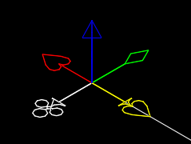
There are five color-coded symbols which indicate fitting direction. The blue spear indicates the direction in which the new item will be placed, or 'stacked'. The red heart, white club, yellow spade and green diamond symbols determine the orientation of the item. For an elbow or tee this means the end of the ell/tee will point in the selected direction. For a backflow, the top face of the valve will point in the selected direction.
You must have at least one Ski Pole placed before inserting the first component. Subsequent items will add Ski Poles at most connection points. Ski Poles are small, so you may need to zoom in on them.
HydraCARDs (Troubleshooting)
For HydraCARDs regarding Insert Ski Pole: [Click Here]