
 HydraDOCs
Appearance
Remove Coupling / Blocks
Shortcut: RB
Associated: Most Coupling commands
Remove any block, particularly couplings from pipes. Works in reverse to the Break In Block command.
When you select the Remove Blocks command, the box at left will appear:
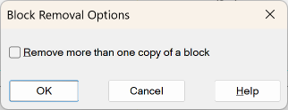
Check the Remove more than one copy of a block box if you have more than one block to remove.
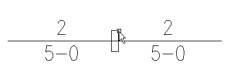
Press OK and pick the item to be removed. In the above example, select the coupling.
If you check the Remove more than one copy of a block option you will first be asked to pick a block to set as a filter, then a selection set around all the blocks of that type to be removed. Any blocks that do not match that filter will be ignored, so feel free to grab an easy window.
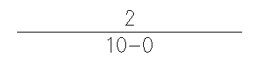
The pipes are joined at the insertion point, and the pipe length changed.
HydraCARDs (Troubleshooting)
For HydraCARDs regarding Coupling Setup: Click Here