
 HydraDOCs
Appearance
Single Coupling
Layer(s): SPRNK2, SPRKDAT1, SPRKDAT2, SPRKDATA
Shortcut: SI
Associated: Coupling Setup / Ell/Tee / Custom Coupling / Multiple Couplings / Remove Blocks / Takeouts
Ribbon: Insert Panel
Insert a single coupling with the takeout set according to the Coupling Setup command. The example below shows a 4” main connected to a system riser. Through the Coupling Setup command, the fitting type of FireLock was chosen with a diameter of Largest.
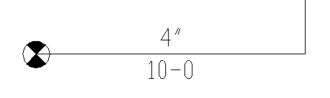
Select Single Coupling and then pick the pipe towards the end with the riser.
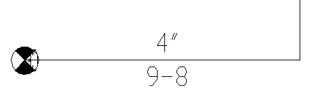
The FireLock coupling is inserted with a takeout of 4”. This is equivalent to the takeout for a 4” FireLock 900 Elbow. The pipe length is changed to accommodate the fitting.
Tip - If Single Coupling is used twice at an elbow location, using two different diameters, then a reducing elbow will automatically be listed.
HydraCARDs (Troubleshooting)
For HydraCARDs regarding Single Coupling: [Click Here]