
 HydraDOCs
Appearance
Hanger Osnaps
Layer(s): HANGERS
Associated: Insert One Hanger
Ribbon: Insert Panel
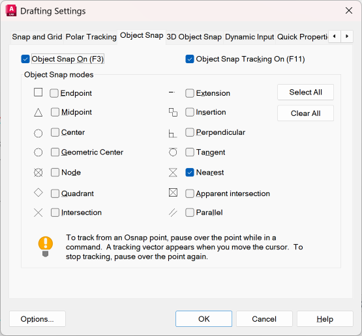
Object snaps that are used by hanger commands. Set your choices on the Object Snap tab of the AutoCAD Drafting Settings box brought up by this command. The default is Nearest, as this is sufficient for hanger insertion. This setting is stored in your drawing and will be remembered each time you insert a hanger.
Hangers must be placed so that at least part of the ‘tick’ is touching one and only one desired pipe.
HydraCARDs (Troubleshooting)
For HydraCARDs regarding Hanger Osnaps: Click Here