
 HydraDOCs
Appearance
CPVC List
Layer(s): TEXT
Shortcut: CPVC
Associated: View Last CPVC List
Ribbon: Process Panel
CPVC List provides a quick and easy method for producing a bill of materials for sprinkler projects for material not fabricated, such as CPVC.
CPVC List was originally created with residential designers in mind but will work well for any application where a full blown stocklist is not required. With this command you can insert a bill of materials table directly into your drawing, print it from a text file, or open it in HydraLIST. Be aware that the material list will always add 1 foot of 1" CPVC pipe for each pendent sprinkler.
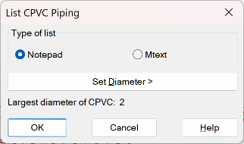
Select whether you want the list as a Notepad file or have it be inserted on your drawing as Mtext.
Use Set Diameter to set the maximum pipe diameter that the utility will include in the bill of materials. Larger pipe will be ignored. Press OK.
Select your pipes and heads.
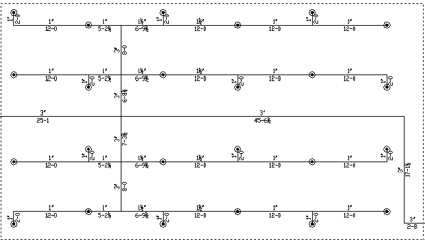
Select your system or press the Enter key to select all pipes and heads.
Make sure that you size your pipes with diameters and lengths before making your selection. CPVC List requires this information when producing your bill of materials.
Two files will be created:
CPVCStocklist.txt, which will open in Notepad if you selected the Notepad option.
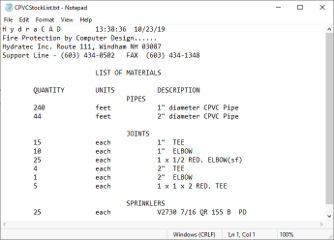
CPVCStockList.txt will be saved to the \HES\HydraCAD\Ver50\Temp folder. You can save this file with another name and/or print your list. This file is overwritten each time this command is used.
A second file, LastCPVCList.itf will be placed in the \HES\Hydlist\Ver50\Data\Inven folder. You can open this file in HydraLIST to produce a more comprehensive stocklist if you want.
To do this, start HydraLIST. If it is a new HydraLIST file, you will have to save the file with a name and provide a Project Number in the Heading tab.
Navigate to the Miscellaneous tab and create a new Section ID.
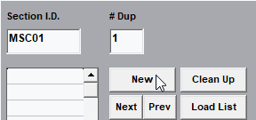
Press the Load List button and pick the LastCPVCList.itf file. Press Open.
The data will appear in the Miscellaneous table. You can now run an error check on the data to see if all the fittings exist or if they will require bushings.
You can also edit or add to the data and process the stocklist if desired.
HydraCARDs (Troubleshooting)
For HydraCARDs regarding CPVC List: [Click Here]