
 HydraDOCs
Appearance
Stop
Layer(s): SL01
Shortcut: STOP
Ribbon: Process Panel
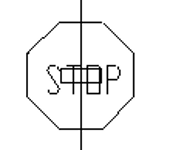
Insert Stop signs, which will instruct AutoList to stop listing at the inserted location. Typically, each loop in a system (including grid lines) requires a stop sign to ensure the main or line gets listed properly, and with the correct endpreps. This keeps one main or line 'running over' piping that should belong to another. Stop signs are also useful when you only want to list part of a system, such as an office area, beyond which a feed main runs to a non-complete warehouse or the like. A stop sign on the feed main will ensure that anything beyond there does not get listed, assuming that no main or line tags are beyond the stop sign.
Pick Insertion Point or Right Click to insert many Stop Signs at once …
Pick a point for insertion such as the pipe into a coupling, for a single insertion.
For multiple insertions right-click and pick a block such as a coupling. Pick the area for insertions with a window and Stop signs will be inserted where HydraCAD finds the same block.
Note: Stop signs cannot be placed on riser nipples. To 'stop' listing a rise up or down, use a Fake tag, as set up in the New Tag dialog box. Think of this as a directional stop sign. See the New Tag topic for more on this.
HydraCARDs (Troubleshooting)
For HydraCARDs regarding Stop: [Click Here]